Record payments
A payment records money received for a loan. Finsaku then distributes the amount according to the selected payment action, allocation order, due amounts, and product rules.
- For
- Authorised loan-servicing users recording or correcting received money.
- Requires
- An eligible loan, payment permission, payer information, and the product's available action and allocation options.
- Available when
- The current loan status exposes Payments and permits payment calculation and creation.
- Before you begin
- Match the receipt to the loan, payer, amount, and date and check for an existing payment or pending provider callback.
- Expected result
- The payment appears once with the intended distribution, and the schedule and current figures reflect the saved action.
Add a payment
- Open the correct loan and select Payments.
- Choose the Payment Type.
- Select or confirm the Payer.
- Review the Payment Order supplied by the product.
- Enter the Amount and Payment Date.
- Choose the Payment Action.
- Review the before, pending, deposit, and after figures.
- Select Add and confirm that the payment appears in the list.
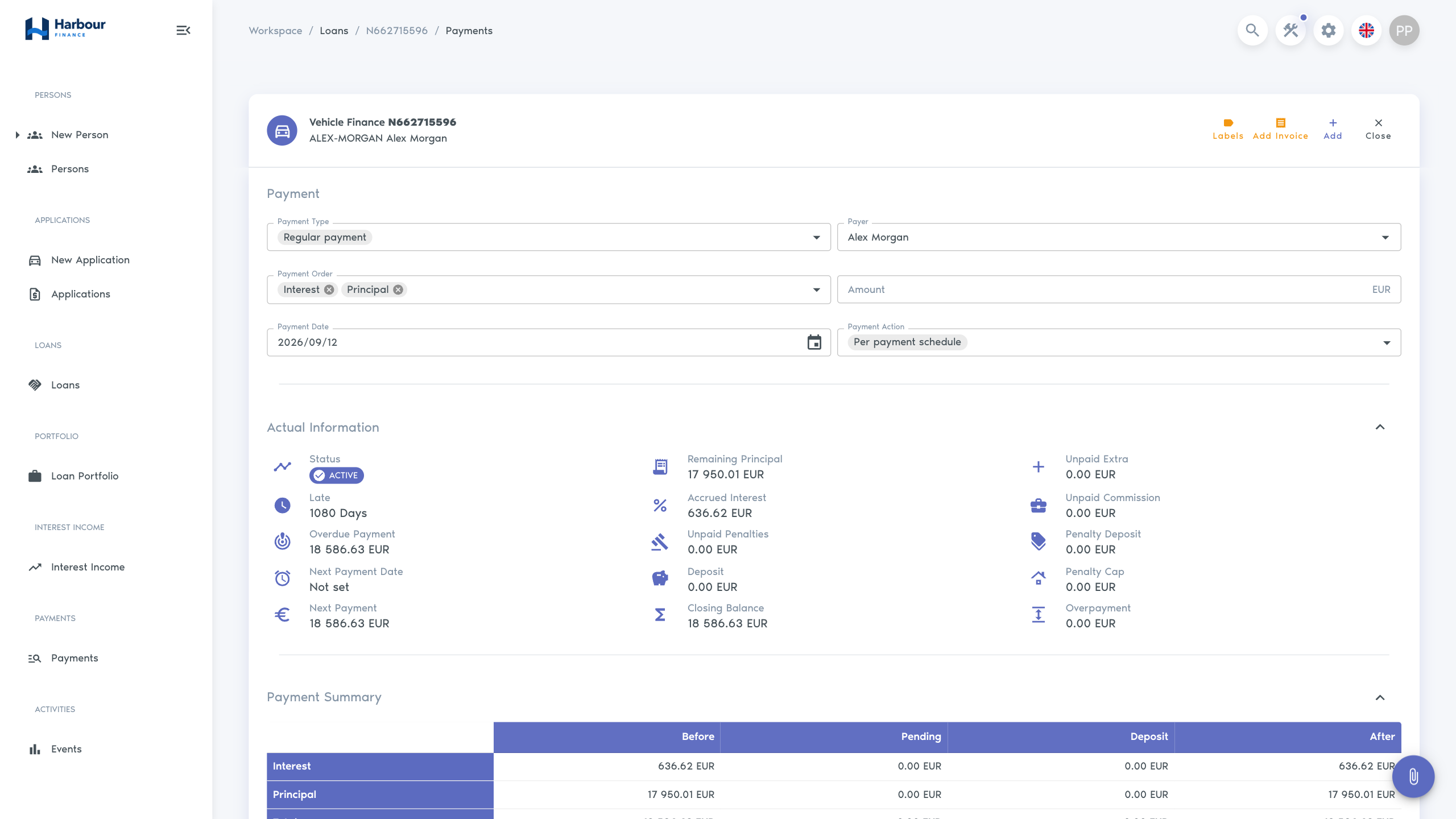
Finsaku does not allow a future payment date. The date also cannot normally be earlier than the loan's permitted last-payment boundary.
Payment types and actions
| Choice | Meaning |
|---|---|
| Regular payment | A normal receipt distributed using the chosen allocation order. |
| Discount | A receipt using the configured discount treatment, commonly with penalty priority. |
| Per payment schedule | Apply money against currently due schedule amounts. |
| Full repayment | Calculate and apply the amount as a closing repayment. |
| Cession | Apply the configured cession treatment when that process is available. |
| Write-off | Apply the configured write-off treatment when available. |
Active loans normally offer Per payment schedule and Full repayment. Cession and write-off options depend on loan status, product, and permission.
Allocation orders
An allocation order controls which amounts receive money first. Available lines can include commission, interest, principal, penalty, permit preparation, debt collection, vehicle repossession, reinstatement fee, and amendment fee. The product determines the actual choices and their order.
Review the preview before saving. Two payments of the same amount can produce different balances if their dates, actions, or allocation orders differ.
Correct a payment
Payment deletion is a corrective operation and normally proceeds from the newest eligible payment backwards. It reverses the affected calculation and can change later balances. Confirm the payment number, amount, payer, and date before deleting it, then recheck the schedule and Actual Information.
Use Allocation and schedules to interpret the result.
Follow Service a loan and record a payment for the complete loan-to-reconciliation path.
Check related ledger postings
When automatic booking is enabled and matching account mappings are configured, payment allocation and eligible payment deletion also post the resulting changes to the general ledger. These postings use the date of the operation, which can differ from Payment Date.
Use Review transactions and balances to compare the posted amounts with the loan's payment and allocation. A manual ledger transaction does not record a received loan payment or recalculate its schedule.
Reconcile an integrated bank payment
A configured banklink workflow can give the customer a provider payment link. The exact place where that link is produced depends on your organisation's connected workflow; Finsaku does not expose one universal payment-link button in every loan view.
When Neopay confirms a successful payment callback, Finsaku creates a regular loan payment associated with that provider transaction. A cancelled callback records cancellation without creating a loan payment.
Before adding a manual replacement:
- find the provider transaction and its latest state;
- confirm the Finsaku loan, amount, currency, and payment date;
- check the loan's payment list and history for the callback-created payment;
- open the payment distribution and verify its allocation;
- wait or escalate when callback delivery is still uncertain.
Do not create a manual duplicate merely because the customer's browser did not show a completion page. A provider callback can still arrive independently. Administrators can use Banklink integration guidance to verify configuration and reconciliation evidence.