Configure the general ledger
The general ledger uses a chart of accounts, a base currency and dated currency rates to record debit and credit bookings. Set the base currency before customising accounts or recording the first transaction.
- For
- Administrators responsible for ledger setup and currency rates.
- Requires
- The relevant ledger view and modify permissions, and the organisation's agreed account structure and currency settings.
- Available when
- Your permissions expose the required pages under Administration → Ledger. Base currency changes are available only before the first transaction.
- Before you begin
- Confirm the base currency, supported currencies, required loan and party references, and any automatic booking configuration.
- Expected result
- The chart contains the intended posting accounts and reference requirements, with rates available for foreign-currency booking dates.
Set up before the first posting
Follow this order for an unused ledger:
- Confirm Supported currencies in General Settings.
- Open Administration → Ledger → Configuration and confirm Base currency.
- Review and customise Chart of Accounts.
- Enter the required Currency Rates.
- Review Automatic Booking if your organisation uses it. Arrange any mapping changes with the administrator responsible for ledger configuration.
The first manual or automatic transaction locks the base currency. Complete this review before lending or payment operations that create automatic bookings.
Choose the base currency
Base currency is the common currency in which a transaction's debits and credits must balance. An account can have a different currency; Finsaku converts its booking amounts to the ledger base currency.
Open in Finsaku: choose the ledger base currency
Select a supported Base currency, then select Save. Finsaku opens Chart of Accounts after saving.
Reopen Configuration to check the saved currency. After the first transaction, the page explains that the base currency is locked; the field is disabled and Save is unavailable. Changing Default currency in General Settings is not a way to change a ledger that has already been used.
Maintain the chart of accounts
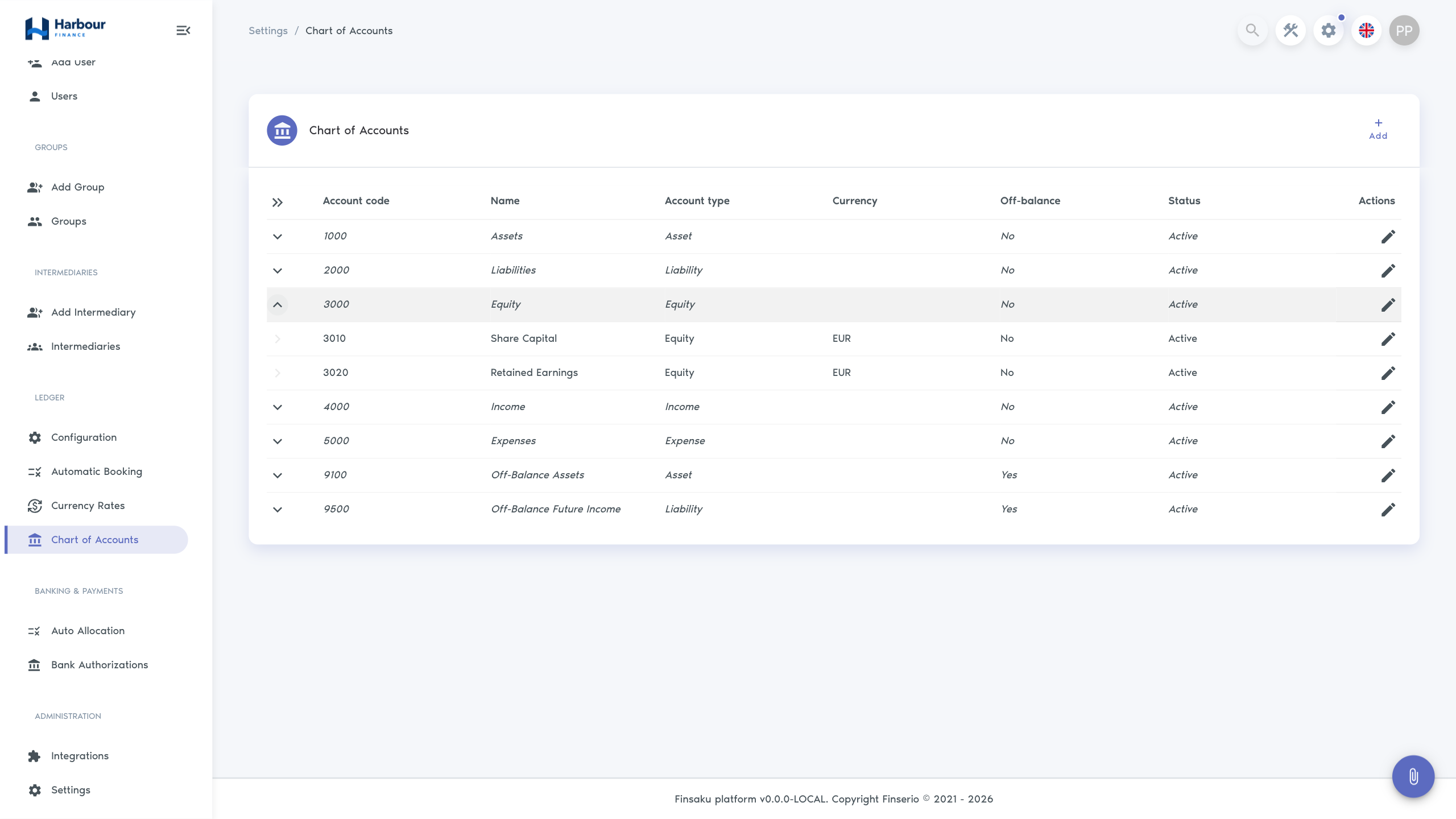
Open Administration → Ledger → Chart of Accounts. The list groups accounts beneath their parent headers and shows account code, name, type, currency, off-balance classification and status. Expand a header to see its detail accounts.
New tenants receive a default chart that they can customise. Existing tenants without accounts need their ledger initialised by the platform administrator. Changing the supported-currency list later does not add or remove accounts in an existing chart; review the detail accounts and rates for each currency you intend to use.
Open in Finsaku: review the chart of accounts
Select Add to open Add ledger account, or the row's Edit control to open Edit ledger account. Fill in the account fields, then select Add for a new account or Save for an existing account. Check the saved row and its position in the chart.
| Field | Meaning and choices |
|---|---|
| Account code | Required account identifier. Each account code must be unique within the tenant. |
| Name | Required name shown in the chart and account selectors. |
| Account type | Asset, Liability, Equity, Income or Expense. |
| Account kind | Header groups accounts. Detail receives bookings. A new account initially uses Header. |
| Parent account | Optional header under which the account appears. Selecting a parent changes an unbooked account to Detail; clearing it changes that account to Header. Check the final kind before saving. |
| Currency | Required for a Detail account. Choices come from the tenant's supported currencies. Bookings use this currency. |
| Status | Active or Inactive. New accounts start as Active. Only active detail accounts can receive bookings. |
| Off-balance | Classifies the account's bookings as off-balance. A detail account must have the same setting as its parent. On-balance and off-balance bookings must each balance separately within a transaction. |
| References required on bookings → Party | Requires a party reference on every booking to this detail account. |
| References required on bookings → Contract | Requires a contract reference on every booking to this detail account. For lending, Contract refers to the loan. |
An account with bookings has a locked Currency. A detail account with bookings also has a locked Account kind, so it cannot become a header. Changing a parent header's Off-balance setting is rejected if its detail accounts would have a different classification.
Before making an account inactive or changing its required references, check Automatic Booking. A rule that still points to an inactive account can prevent the associated loan operation from completing. Inactivating an account does not remove its recorded bookings.
Maintain currency rates
Open Administration → Ledger → Currency Rates. The page has one row for each supported currency other than the ledger base currency. Not set means no rate has been entered for that pair.
Open in Finsaku: maintain currency rates
- Select the currency row's Edit control.
- Choose Rate orientation and enter a positive Rate in that orientation.
- Set Valid until to today or a future date.
- Select the row's Save control. Check the saved orientation, rate and date together.
Cancel discards the unsaved row changes. Only one row can be edited at a time.
Read the rate orientation
Rate orientation states how many units of one currency equal one unit of the other. For example, an illustrative rate of 1.10 with 1 EUR = Rate × USD means 1 EUR = 1.10 USD. A USD booking is divided by 1.10 to obtain EUR; an EUR amount is multiplied by 1.10 to obtain USD.
Changing orientation does not automatically invert the number in Rate. Enter the rate that belongs to the selected orientation before saving. Converted amounts are rounded to the smallest unit of the target currency.
Understand the date and history
Valid until is the inclusive last date covered by the rate. For a booking date, Finsaku selects the rate with the earliest Valid until date that is on or after that booking date. It does not treat this field as a start date.
Saving the same currency pair and Valid until date updates that rate. Saving another date adds a separate rate. When more than one rate exists, select Show more to open All currency rates, listed with the latest end date first. The history shows Rate base currency, Rate quote currency, Rate and Valid until.
The main row shows the rate applicable today. If every saved rate has expired, it still displays the last saved rate. Check Valid until before relying on the displayed value for a new posting. Posting fails if no rate covers the booking date.
Rate changes affect subsequent conversions. They do not recalculate amounts already stored in ledger transactions. During posting, Finsaku calculates the base amount again using the saved rate for the booking date.
Assign access for the task
Ledger permissions are separate from loan-processing permissions. Grant the view permission for each page a user needs to open, plus the corresponding modify permission for changes. Use permission groups to assign access.
| Task | Permission labels |
|---|---|
| Review the chart | View chart of accounts |
| Add or edit accounts | Modify ledger accounts |
| Review base currency and automatic booking rules | View ledger configuration |
| Change base currency before posting | Modify ledger configuration |
| Review rates | View currency rates |
| Enter or change rates | Modify currency rates |
| Review recorded transactions and account balances | View ledger transactions |
| Post a manual transaction | Post ledger transactions |
A user who can post transactions can select posting accounts and obtain conversions without permission to edit accounts or currency rates. Viewing automatic booking rules does not provide a rule editor.
For daily work, see Review ledger transactions and account balances and Post a manual ledger transaction.
Resolve a setup or saving problem
| What you see | Check and next action |
|---|---|
| Base currency cannot be changed | Check the locked message. Once a transaction exists, the base currency cannot be changed through Configuration. |
| Add, Edit or Save is unavailable | Check the page's modify permission. Base currency and booked-account restrictions still apply to users with modify permission. |
| The chart is empty in an existing tenant | Confirm that the page loaded successfully, then ask the platform administrator to check ledger initialisation. |
| An account code is rejected | Check for an existing account with that code, including accounts under collapsed headers. |
| An account cannot be saved after reparenting | Check its kind, required currency and Off-balance setting against the selected parent. |
| An account is absent from posting choices | It must be an active detail account with a currency. |
| A rate cannot be saved | Check that the rate is positive, the two currencies differ, one is the ledger base currency, and Valid until is not in the past. |
| A foreign-currency posting reports no rate | Check the booking date against the pair's rate history. A displayed expired rate does not cover later dates. |
| A loan operation fails after an account change | Review the affected automatic booking rules, account status, currency and reference requirements before retrying. |