Integrations
Use an integration to connect Finsaku to an external service. The integration type sets the business function. The provider sets the available service and fields.
- For
- Tenant administrators connecting an approved external provider.
- Requires
- Integration administration permission, provider credentials, and access to dependent product or workflow settings.
- Available when
- Finsaku supports the integration type and provider for the intended function.
- Before you begin
- Obtain test credentials, endpoints, sender or channel details, and a non-sensitive verification case.
- Expected result
- The enabled connection is selectable by its dependent configuration and produces verifiable Finsaku and provider evidence.
Common settings
Every integration has a unique Name and an Enabled switch. The type and provider are chosen when the integration is added. The name identifies the connection in product settings, message forms, event actions, or enrichment choices.
Create and validate an integration while disabled, then enable it after its dependent product or workflow configuration is ready. Disabling a connection prevents new use but does not remove earlier messages, reports, documents, payments, or history.
Treat API keys, passwords, access keys, project keys, tokens, private keys, and similar values as secrets. Enter them only in the integration form, limit who can edit integrations, and use separate credentials for production and non-production services.
Currently available types and providers
| Integration type | Available provider | What it enables |
|---|---|---|
| Mailgun; Amazon SES | Manual and event-driven email, including invoice email and generated attachments. | |
| SMS | Text2Reach | Manual and event-driven text messages. |
| Credit Bureau | KIB | Credit report preparation and configured loan-data export. |
| Loan Calculator | Loan Calculator | External calculation option for a lending product. |
| Banklink | Neopay | Payment link and confirmed bank-payment callback. |
| Instant Messaging | Slack | A configured Slack channel for workflows that use instant messaging. |
| Politically Exposed Person | viss.gov | Person PEP checks and label maintenance. |
| Document Generation | Docugenerate | PDF and DOCX generation from product templates. |
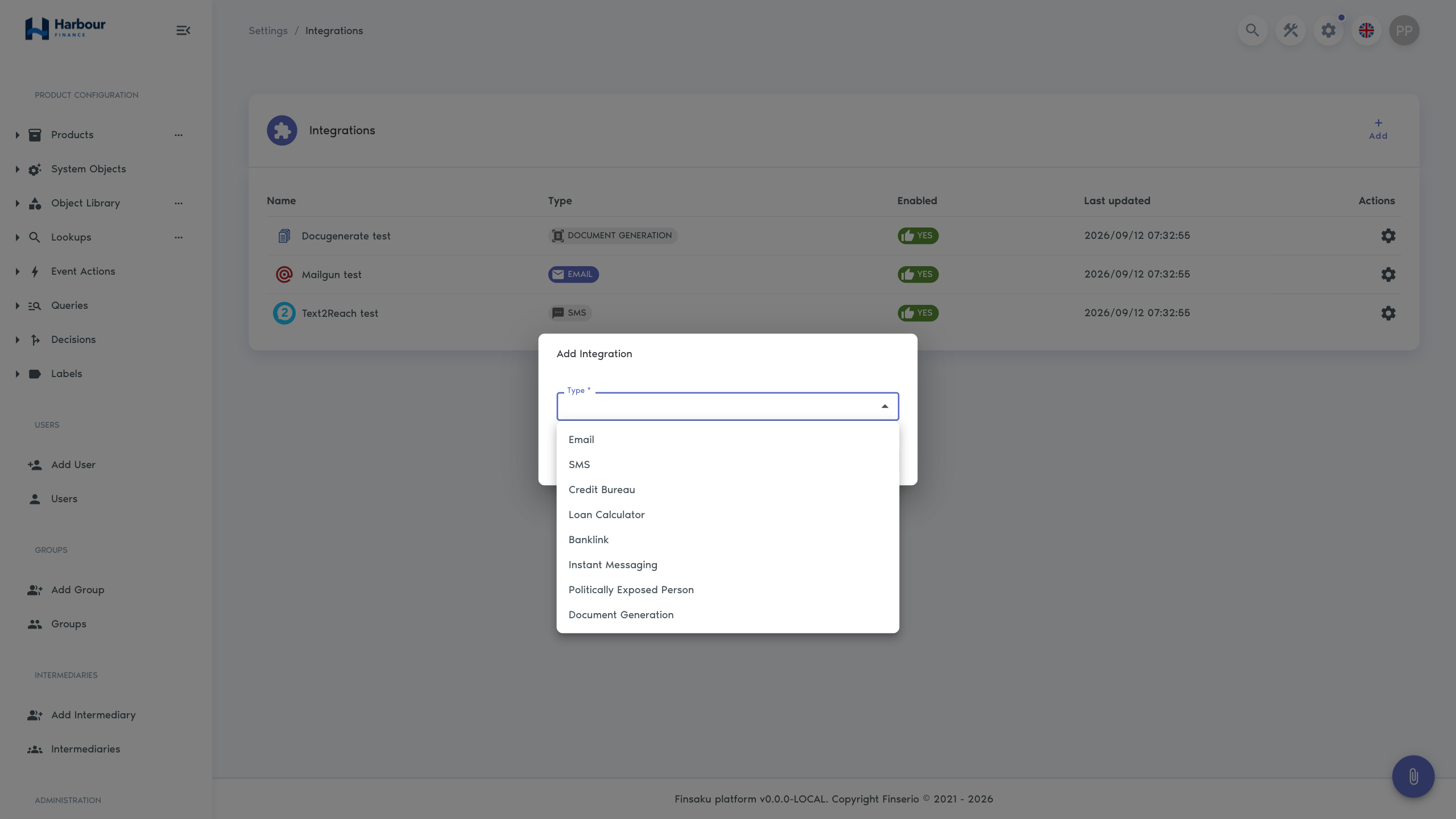
Email providers appear in manual email forms, email event actions, and other configured sending features. A template is not required for a manual message, but an enabled provider is required to send it.
Mailgun
| Setting | Purpose |
|---|---|
| API URL | Mailgun service endpoint used by the account. |
| API key | Credential used to authenticate requests. |
| Domain | Sending domain configured in Mailgun. |
| Sent from | Default sender shown on outgoing messages. |
Verify the sender domain and allowed sender before enabling. Test delivery to an internal address and check both accepted and rejected responses.
Amazon SES
| Setting | Purpose |
|---|---|
| Environment | Production, Staging, or Custom endpoint selection. |
| Sent from | Default sender shown on outgoing messages. |
| Access key ID | AWS access identity. |
| Secret access key | Matching secret credential. |
| Base URL | Required when Custom is selected. |
Confirm that the selected region or custom endpoint, sender verification, and account sending mode match the intended environment. A successful save only validates the Finsaku form; it does not prove that SES will accept a message.
Email dependencies
Invoice email additionally needs product invoice settings and an email template. Generated document attachments need a Document Generation integration and selected document templates. Event-driven email needs a matching enabled event action.
SMS
Text2Reach
| Setting | Purpose |
|---|---|
| API URL | Text2Reach service endpoint. |
| API key | Credential used to authenticate requests. |
| Sent from | Sender name or number supported by the provider account. |
The provider is available to manual SMS forms and SMS event actions. Test sender approval, recipient number format, special characters, dynamic values, and messages longer than one SMS segment. The editor's 160-character count is a guide; substituted content and character encoding can change provider billing or segmentation.
Credit Bureau
KIB
KIB supports two functions: preparing a credit report for an application's borrower and exporting selected loan records. Configure only the function covered by your service agreement. Confirm that users have authority to request or view the data.
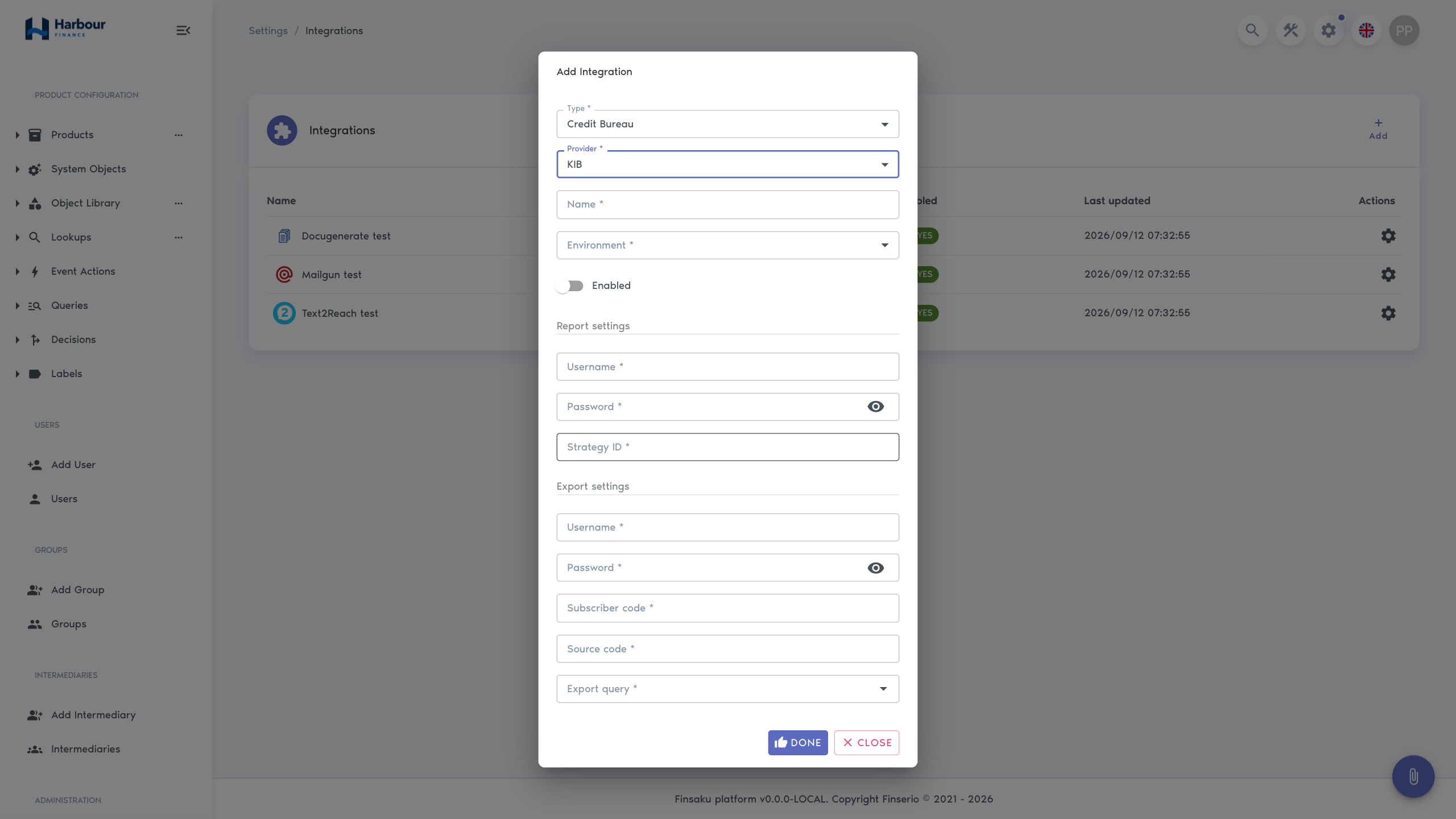
| Setting group | Settings | Purpose |
|---|---|---|
| Environment | Production, Staging, or Custom | Chooses the KIB service environment. |
| Report | Username, password, strategy ID | Authenticates and selects the report strategy. |
| Custom endpoints | Authentication base URL, report base URL, export base URL | Required for a Custom environment. |
| Export | Username, password, subscriber code, source code | Identifies and authenticates the exporting organisation. |
| Export selection | Query | Chooses the saved loan query used as the export source. |
The saved export query determines which loans are selected. Test it with the export user's visibility, date assumptions, and a small known result set before scheduling or enabling production export.
A prepared report is stored as enrichment information and can be downloaded from the relevant application workflow. Results are point-in-time information. Check their date and do not repeatedly request a report while an earlier request may still be processing; provider calls may have a cost.
Use Credit reports and enrichments for the user request flow, unsaved-change warning, history, and result-review checks.
Loan Calculator
Loan Calculator
| Setting | Purpose |
|---|---|
| Base URL | Endpoint of the external loan-calculation service. |
After the integration is enabled, its name can be selected as a product's calculator. The external service then supplies calculated values and the payment schedule for applications using that product.
Test minimum and maximum amounts, terms, first-payment dates, leap years, interest and commission variations, and rounding. Compare the returned schedule total with the summary. Before disabling or changing the endpoint, identify every product that selects this calculator.
Banklink
Neopay
| Setting | Purpose |
|---|---|
| Project ID | Identifies the Neopay project. |
| Project key | Secret used to sign or authenticate the payment flow. |
The integration creates a payment link. A confirmed successful provider callback creates a regular loan payment associated with the provider transaction. A cancelled callback records cancellation but does not create a loan payment.
The payment link is requested by the workflow or connected service configured for your tenant. Enabling Neopay does not add one universal Generate Payment Link action to every Finsaku loan page.
Reconcile a callback
Compare the provider transaction ID and state with the Finsaku loan, payment amount and date, payment list, history, and resulting allocation. A customer's return page is not sufficient evidence that the callback completed.
| Situation | Action |
|---|---|
| Provider is successful and Finsaku payment exists | Confirm loan, amount, date, and allocation; no manual payment is needed. |
| Provider is cancelled and no Finsaku payment exists | Treat it as cancelled; do not record money that was not received. |
| Provider is successful but payment is absent | Preserve the transaction details and investigate callback delivery before adding a manual payment. |
| Finsaku and provider contain possible duplicates | Stop further correction and compare transaction IDs, timestamps, amounts, payment history, and allocations. |
Do not add a manual duplicate while a provider callback may still arrive. Protect callback endpoints and rotate the project key using an agreed change window. Use Record payments for the operator procedure.
Instant Messaging
Slack
| Setting | Purpose |
|---|---|
| Bot token | Credential used by the Slack application. |
| Channel ID | Single channel that receives configured messages. |
This integration defines the Slack destination for platform workflows that use instant messaging. Enabling the connection alone does not choose which events send a message; the consuming workflow must also be configured.
Use a channel ID rather than a display name, give the bot only the required workspace scopes, and invite it to the destination channel where necessary. Test with non-sensitive content and confirm that the channel membership matches the intended audience.
Politically Exposed Person check
viss.gov
| Setting | Purpose |
|---|---|
| API URL | Base service endpoint. |
| Token URL | Endpoint used to obtain access. |
| Transaction URL | Endpoint used for transaction processing. |
| Client ID and client secret | Client credentials. |
| Private key and public key | Key material used by the connection. |
| Audience and scope | Requested service access. |
| Service ID | Identifies the service operation. |
| Chosen label | Label maintained when the result indicates PEP status. |
The check can run when configured person or lending workflows require it, and a scheduled recheck can refresh the result. Finsaku can apply the chosen label for a matching result and remove a stale label after a later applicable check.
Use a dedicated label with an agreed meaning. Restrict access to the result and keys, follow the approved lawful basis and review procedure, and treat provider errors or unavailable data separately from a confirmed negative result.
Document Generation
Docugenerate
| Setting | Purpose |
|---|---|
| API URL | Docugenerate service endpoint. |
| API key | Credential used to generate documents. |
An enabled integration makes product document templates and document-generation actions available. Users and event actions can create PDF or DOCX output, attach it to an application or loan, or include it in email.
Test each template with representative and missing data. Verify the generated format, pagination, amounts, dates, repeated sections, language, and attachment target. Template data sent to the provider can contain personal and financial information. Confirm that the service environment and retention terms are approved.
Before enabling an integration
Before enabling any integration:
- confirm provider account, contract, environment, endpoint, and credential owner;
- use a uniquely descriptive name such as provider plus environment;
- identify every product, template, event action, query, label, or user flow that depends on it;
- test one successful request and the main provider error cases;
- confirm what the user sees when the provider is slow or unavailable;
- record credential rotation and support contacts without storing secret values in ordinary documentation;
- enable the integration and observe its first real executions.
Use Integration data flows to review the information sent, returned results, account ownership, and evidence available for each provider. Use Supported integration interfaces before designing a webhook, MCP connection, or external API client.