Platform overview
SaaS for lending operations
Finsaku brings loan origination, servicing, customer communication, and operational control into one browser-based platform.
Each organisation configures its Finsaku tenant around its lending products and operating model. Workspace users handle borrowers, applications, loans, payments, and follow-up work. Administrators define the collected data, calculations, decisions, templates, integrations, and access behind those tasks.
What Finsaku covers
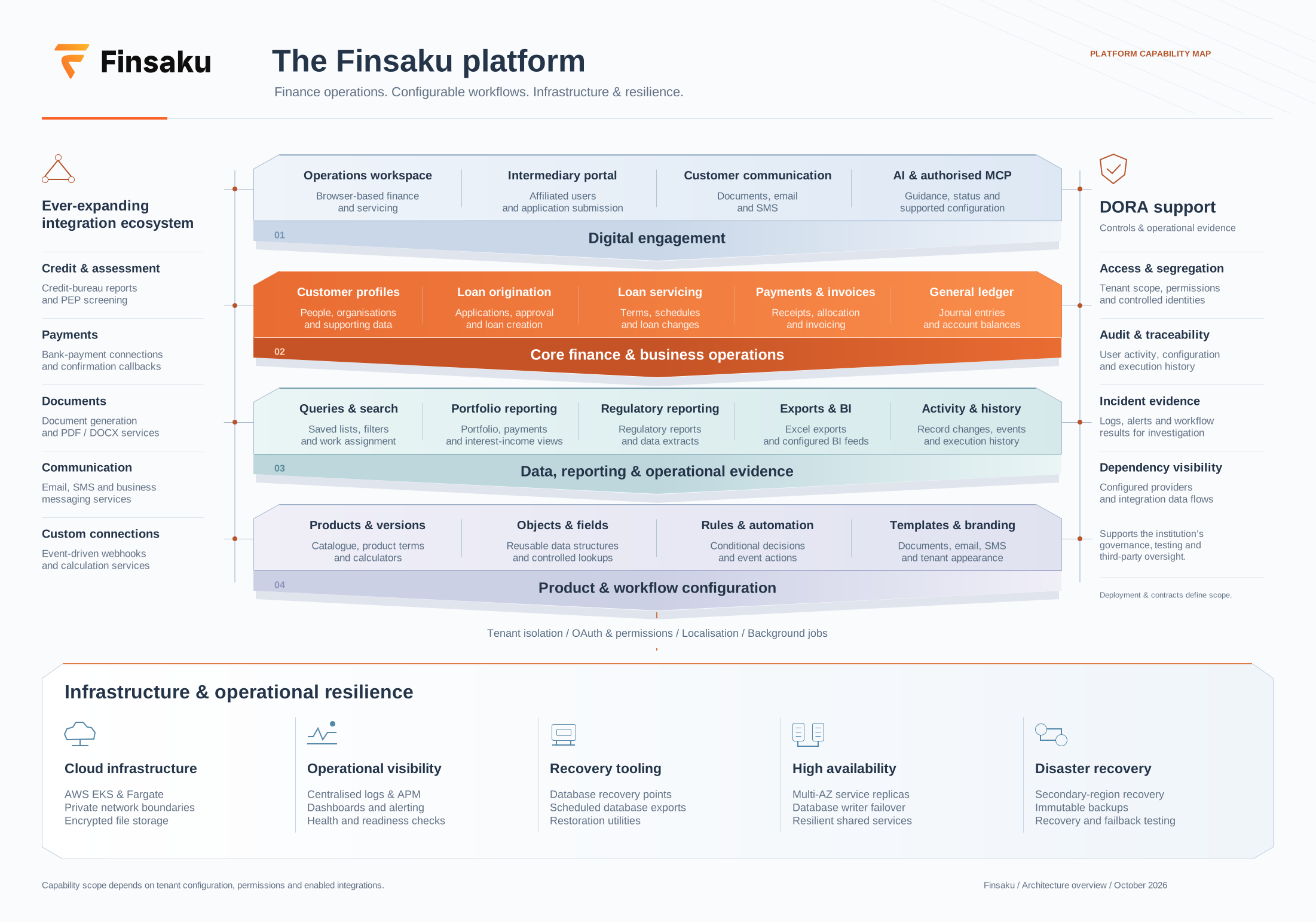
The map connects daily lending work with the configuration and services behind it. See integration data flows for provider connections and service assurance for operational responsibilities.
Borrowers and applications
Maintain people and organisations, select a lending product, collect the required information, calculate terms, and store supporting information.
Review and create the loan
Run the configured checks, save review outcomes, approve or reject the application, and use Lend to create the loan.
Schedules, payments, and changes
Review current terms and schedules, enter money received, inspect its allocation, and apply the permitted loan actions.
Documents, messages, and context
Generate product documents, send email or SMS messages from configured templates, store files, and add notes, labels, or enabled enrichment results.
Queues, reporting, and evidence
Use saved queries, search, assign applications and loans to users, export permitted data, and review portfolio, change-history, activity, and audit views.
Products, workflow, and connections
Configure product versions, fields, calculations, decisions, templates, event actions, integration providers, intermediary channels, users, and permissions.
Ways to use Finsaku
Finsaku separates daily lending work from the configuration that shapes it. Connected workflows extend those areas when the tenant has the required provider or deployment capability.
Workspace
Find borrowers, process applications, service loans, enter payments, prepare documents and messages, and work from saved lists.
Administration
Define products, data, templates, workflow rules, integrations, saved queries, users, partner affiliations, and permissions.
Providers and external clients
Connect supported integration providers, call webhooks after configured events, distribute through intermediaries, or use authorised MCP clients where available.
The menu entries and actions visible to a user depend on active permissions, product configuration, saved queries, current status, and enabled integrations.
How configuration becomes daily work
Configuration and operation
Approval saves the decision. It does not create a loan. Lend creates the linked loan and starts servicing.
How lending information is organised
| Part | What it contains | When it appears |
|---|---|---|
| Person or organisation | Borrower identity, contact details, bank details, documents, notes, and related activity. | Created before or while starting an application. |
| Product | Lending rules, collected information, calculator, templates, and available operations. | Configured by an administrator before users create applications. |
| Application | Requested terms, calculation, supporting information, and review status. | Created for a person or organisation under a selected product. |
| Loan | The agreement, current terms, balance, schedule, payments, and action history. | Created when an authorised user lends an approved application. |
| Instalment | An expected amount and due date in the payment schedule. | Produced by calculation and updated by later loan actions where applicable. |
| Payment | Money received for a loan and its payer. | Entered by a user or confirmed by an enabled payment integration. |
| Allocation | How Finsaku applies a payment to principal, interest, costs, deposits, or other amounts. | Calculated when a payment is processed. |
These lending items are separate from partner access and automation configuration. Use Lifecycle and statuses to see how applications, loans, instalments, payments, and allocations connect. The same page explains how intermediaries differ from affiliations and how enrichments differ from decisions and event actions.
What each action changes
| Action | Result |
|---|---|
| Save an application | Stores the current data without completing an approval step. |
| Approve an application | Saves the decision but does not create a loan. |
| Lend an application | Creates and links the loan. |
| Enter a payment | Stores money received; the allocation shows how that money was applied. |
| Add a label or note | Adds classification or context without changing the formal status. |
| Change a loan | Creates a loan action so the original and changed terms remain traceable. |
Choose your next step
- New to the interface: use Navigation and search to learn the main controls.
- Learning application and loan states: open Lifecycle and statuses.
- Looking up a Finsaku term: use the Glossary.
- Ready to practise origination: follow Process a first application.
- Preparing a tenant: start with Set up a new tenant, then Set up a lending product and Configure collected data. Continue with Configure repeated objects when one section must contain several structured entries.