Permission groups
A permission group combines platform permissions and members. Members can be users or intermediaries. An active user's effective access can come from more than one active group.
Build groups around stable job responsibilities, such as application review, lending, payment administration, reporting, or configuration. Do not create a separate group for each individual exception.
- For
- Access administrators assigning permissions by job responsibility.
- Requires
- Group, member, and permission list or assignment permissions needed for the change.
- Available when
- The intended users or intermediaries are active and available for membership.
- Before you begin
- List the tasks the role must perform and a neighbouring high-risk operation it must not perform.
- Expected result
- A representative member can complete the intended task and remains blocked from the prohibited case.
Create a group
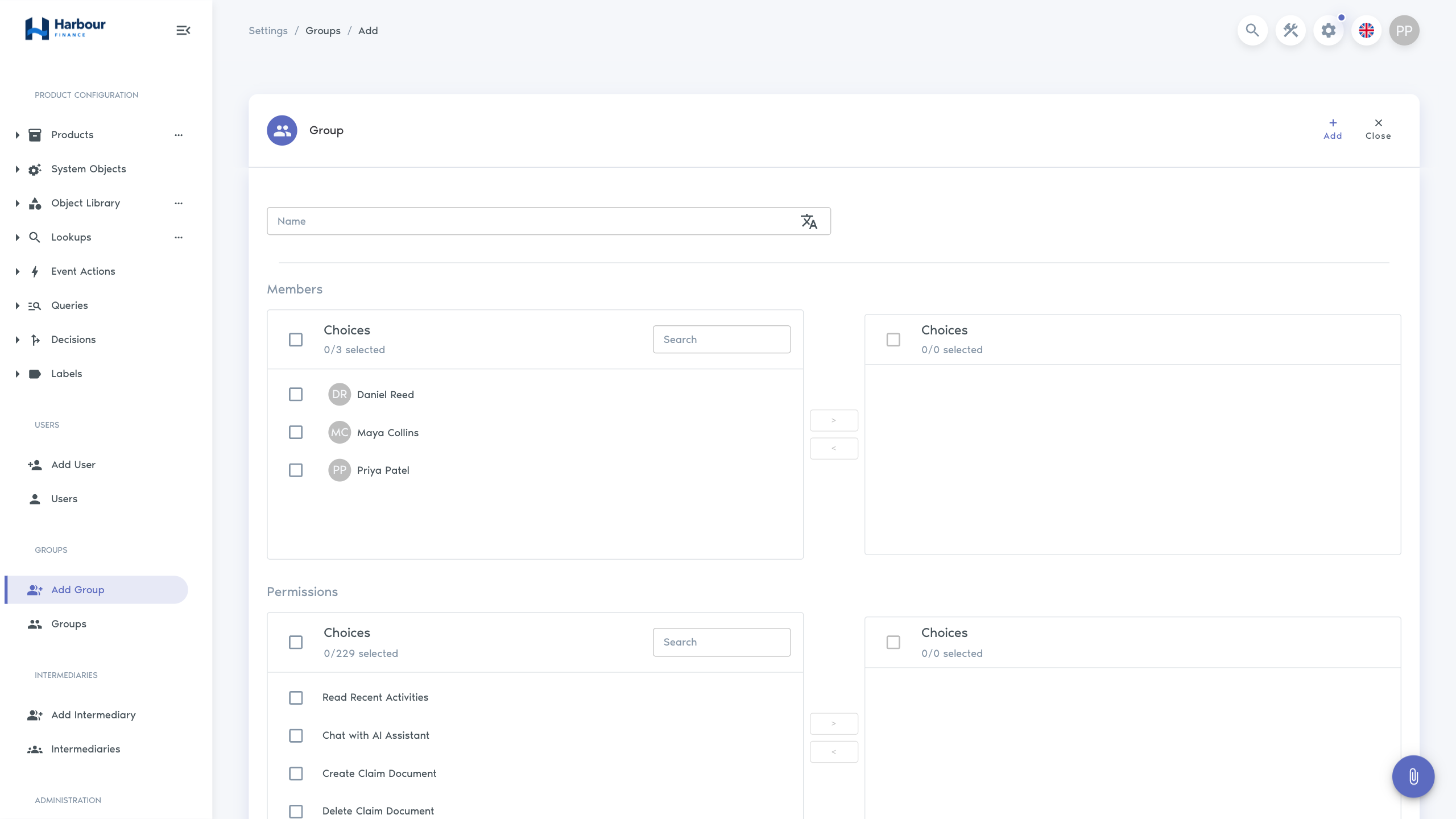
- Open Administration → Add Group.
- Enter the group Name and translations.
- Move the required people or intermediaries into Members.
- Move the required entries into Permissions.
- Select Add.
- Open the group and review its status, members, and categorised permission table.
Permission labels distinguish operations such as Create, List, Read, Update, Delete, Find, processing, export, assignment, history, and administration. Grant the smallest complete set for the task; page access alone does not grant every button on that page.
Add or remove members
From the group view:
- select Assign to add an existing active user or intermediary;
- select Create to create a new user or intermediary already associated with the group;
- use the remove action on a member row to remove only that group membership.
Removing a member from a group does not block or delete the user, delete the intermediary, or remove their other group memberships.
Edit permissions
Select Edit and move permissions between the available and selected lists. Review high-impact operations separately, including:
- lending and loan actions;
- payment creation or deletion;
- export and partner-visible queries;
- user, permission-group, and intermediary administration;
- integration and event-action configuration;
- impersonation and AI assistant access.
After saving, test a normal case and a prohibited case with a representative member. A user can receive additional permissions from another group, so one successful denial does not prove that the group is the only source of access.
Start from a task recipe
Finsaku does not ship customer-service representative, loan-officer, or servicing groups. The default Tenant Manager group is administrative and is not a suitable template for ordinary operational access. Create separate groups from the task slices below and adjust them for the tenant's products, saved queries, affiliations, and separation-of-duties policy.
The permission catalogue uses Quote for a loan application and Contract for a loan. The names below match the permission selector.
| Role and task | Starting permissions | Prohibited test |
|---|---|---|
| Customer service representative — find and read an existing customer | List Persons, Find Persons, Read Person, Read Person Context | The user cannot create or update a customer unless those tasks were assigned. |
| Customer service representative — create or correct customer details | The preceding row plus Init Person, Create Person, and Update Person | The user cannot approve or lend an application. |
| Customer service representative — create, calculate, save, and submit an application | Find Persons, Find All Persons, Read Person, Init Quote, Save Quote, Read Quote, Find Quote, Generate Payment Schedule, and Submit Quote | The user cannot Approve Quote, Reject Quote, or Lend Quote. |
| Loan officer — approve and lend a prepared application | The preceding application set plus Approve Quote and Lend Quote | The application must still be in a status and configured workflow that permits approval or lending. |
| Servicing user — find a loan and record a payment | Find Contracts, Read Contract, Get Contract Summary, List Contract Transactions, Read Contract Transaction, Calculate Payment, Create Payment, List Payments, and Find Payments | The user cannot Delete Payment, lend an application, or export the portfolio. |
| Operations or reporting user — monitor configured work | List Internal Queries plus the permission required by each saved query; add Read Recent Activities, List Quote History, or List Contract History only for the views the role uses | The user cannot change records or Export Contracts unless those operations were approved separately. |
These are starting points, not universal minimum roles. Complete the relevant row as follows:
- Open each Workspace saved query used by the role and note its required permission. The user needs both that permission and List Internal Queries to use an internal query.
- Add optional document, note, email, SMS, assignment, label, or history permissions only when the task includes that feature.
- Keep Approve Quote, Reject Quote, Lend Quote, Delete Payment, Export Contracts, user administration, permission-group administration, and user impersonation in separately reviewed groups where duties must be separated.
- For an intermediary-affiliated role, use List Partner Queries and the partner access design instead of copying the internal recipe. Follow Distribute lending through intermediaries because a permission group alone does not establish the record boundary.
- Test the permitted task from its real entry point, then perform the prohibited test shown in the table. Also review every other active group attached directly to the user or through an intermediary.
Disable or activate a group
| Action | Effect |
|---|---|
| Disable | Stops the group from supplying active access while preserving its definition and membership. |
| Activate | Allows the group's permissions to contribute to member access again. |
Before disabling a group, identify members who rely on it and confirm an alternative for essential work. After changing status, have representative users refresh or sign in again and verify their menus and actions.
Build and test a group
- Define the business task and data scope.
- Add record list/read permissions needed to find the work.
- Add only the create, update, processing, export, or delete operations required.
- Add history permissions needed for investigation.
- Test internal and partner-affiliated users separately.
- Record the group owner and review date outside Finsaku according to the organisation's access process.
Avoid broad wildcard-style administrative access for ordinary operational roles. Separate sensitive duties where your organisation requires independent control.
Troubleshooting
| Symptom | Check |
|---|---|
| User is listed but cannot act | User and group status, exact operation permission, and dependent product or integration configuration. |
| User can do more than expected | Every other group the user or their intermediary belongs to. |
| Member cannot be found for assignment | User is active, is not already a member, and the administrator has member-search and assign permissions. |
| Navigation has not changed | Refresh or sign in again, then check saved-query placement and visibility as well as permissions. |
| Disabling the group did not remove all access | The user can receive the same permission from another active group. |
Use Users for account controls, Distribute lending through intermediaries for a partner application role, and Access model and troubleshooting for the complete access sequence.