General settings
General Settings set the organisation identity, currencies, time zone, product capabilities, languages, and appearance used across Finsaku. Review affected products and users before changing them.
- For
- Tenant administrators maintaining organisation-wide settings.
- Requires
- General-settings administration permission and an impact plan for affected products, users, templates, and integrations.
- Available when
- The account can open Admin Area → Settings.
- Before you begin
- Record the current value and test currency, time-zone, language, product-type, and appearance dependencies as applicable.
- Expected result
- The saved setting appears in a controlled user case without enabling an unsupported product or workflow.
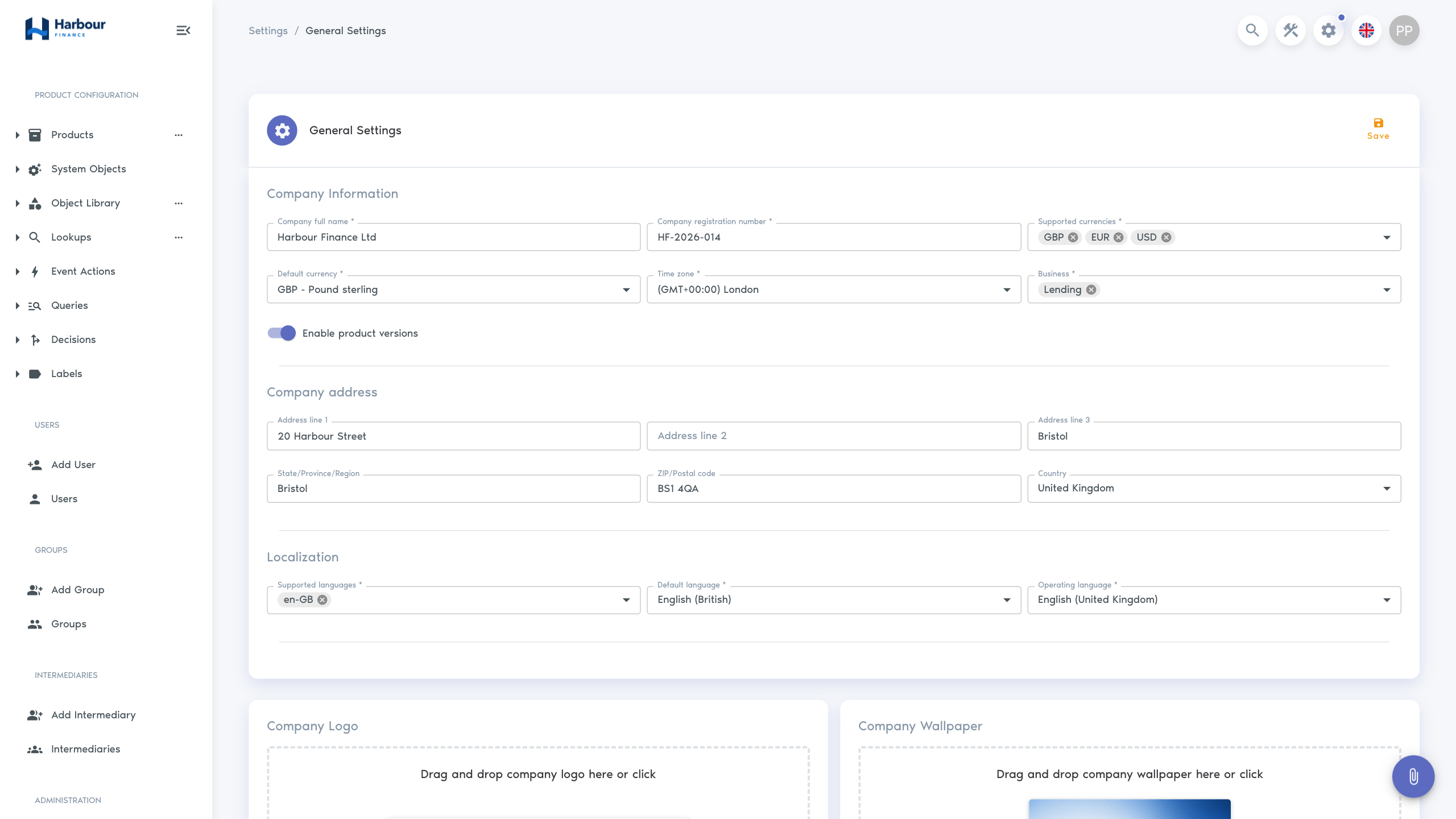
Open Admin Area → Settings to reach General Settings. See the annotated navigation guide for the header control, menu entry, and page title.
Company details
| Setting | Use |
|---|---|
| Full company name | Organisation name available to the platform and generated content. |
| Registration number | Legal or business identifier. |
| Address lines, city, region, postcode, country | Organisation address used where configured. |
Use the approved legal identity. Review document templates after changing company details because existing generated files do not update automatically.
Currency and time
| Setting | Use |
|---|---|
| Supported currencies | Currencies users can select where the product permits. |
| Default currency | Initial currency; it must also be supported. |
| Time zone | Business time used for dates, schedules, decisions, and other time-based processing. |
Adding a currency does not define conversion rates or make every product multi-currency. Confirm calculator, product, document, query, export, and integration support before offering it.
The supported-currency field uses chips. To replace or remove a supported currency safely:
- add the replacement currency first;
- change Default currency to a supported replacement before removing the current default;
- use the delete control on each unwanted currency chip;
- keep at least one currency under Supported currencies;
- save, reopen General Settings, and confirm the supported and default values.
Do not remove the active default first; the current form can become invalid and prevent a clean save.
A time-zone change can affect due-date boundaries, scheduled decisions, event timestamps, and reporting. Record the effective time and test a case around midnight and any daylight-saving transition relevant to the organisation.
Product capabilities
Supported product types control which product families the tenant can configure. Finsaku lending uses the Lending product type. Enable product versions adds the versioned product-definition workflow for authorised administrators.
Do not disable a capability without checking products and draft administrative work that rely on it.
Language and locale
Supported languages determine which translations users can choose. The locale or operating language supplies default formatting and wording. A language should be enabled only when navigation, product fields, lookups, templates, and operational content have usable translations.
Locale can affect how dates and numbers are displayed but does not change the stored business currency or agreed calculation rules.
Appearance
Administrators can maintain the logo, wallpaper, header colour, and primary colour. These settings affect identification and readability, including sign-in and navigation areas. Check contrast, small-screen behaviour, and both light and image backgrounds after changes.
Appearance settings do not change the sender identity in email or the legal identity in documents unless those templates use the corresponding company data.
For the complete first-run sequence and verification checks, follow Set up a new tenant.