Payment allocation and schedules
The payment schedule shows what is expected. Allocations show how received money was used. Compare both when explaining a balance or correcting a payment.
- For
- Loan-servicing and reconciliation users explaining a schedule, payment distribution, or balance.
- Requires
- Access to the loan, payment schedule, payments, and allocation detail.
- Available when
- The loan has a calculated schedule or recorded payment distribution to inspect.
- Before you begin
- Confirm the calculation date, payment number, amount, action, allocation order, and any additional invoice lines.
- Expected result
- You can account for the payment amount across allocation outcomes and explain the resulting schedule and balance.
Instalment, payment, and allocation
| Item | What it represents | Check it when |
|---|---|---|
| Instalment | An expected amount and due date in the loan schedule. | You need to explain what was due and whether it is issued, overdue, paid, or cancelled. |
| Payment | Money received, including payer, amount, date, type, action, and allocation order. | You need to match Finsaku to a receipt or provider transaction. |
| Allocation | The calculated treatment of part of that payment. | You need to explain which scheduled or additional amount was settled, or why money is pending, held, or in overpayment. |
The allocation order is an input to payment calculation. Allocations are the result. See the Glossary for the short definition and related terms.
Payment distribution outcomes
One payment can produce more than one outcome. The date, action, allocation order, due amounts, and product rules determine how each part is classified.
Read the schedule
Each instalment has a due date, amounts such as principal and interest, and a status.
| Instalment status | Meaning |
|---|---|
| New | Expected but not yet issued or due under the configured process. |
| Issued | Active scheduled amount. |
| Overdue | Due date passed with an amount still unpaid. |
| Paid | Required amount was fully settled. |
| Cancelled | Instalment was cancelled by an applicable process. |
The first or final instalment can differ from the others because of day counts, payment-date rules, commission, or rounding.
Read payment distribution
Distribution can be grouped by allocation status, payer, or payment type. Allocation statuses mean:
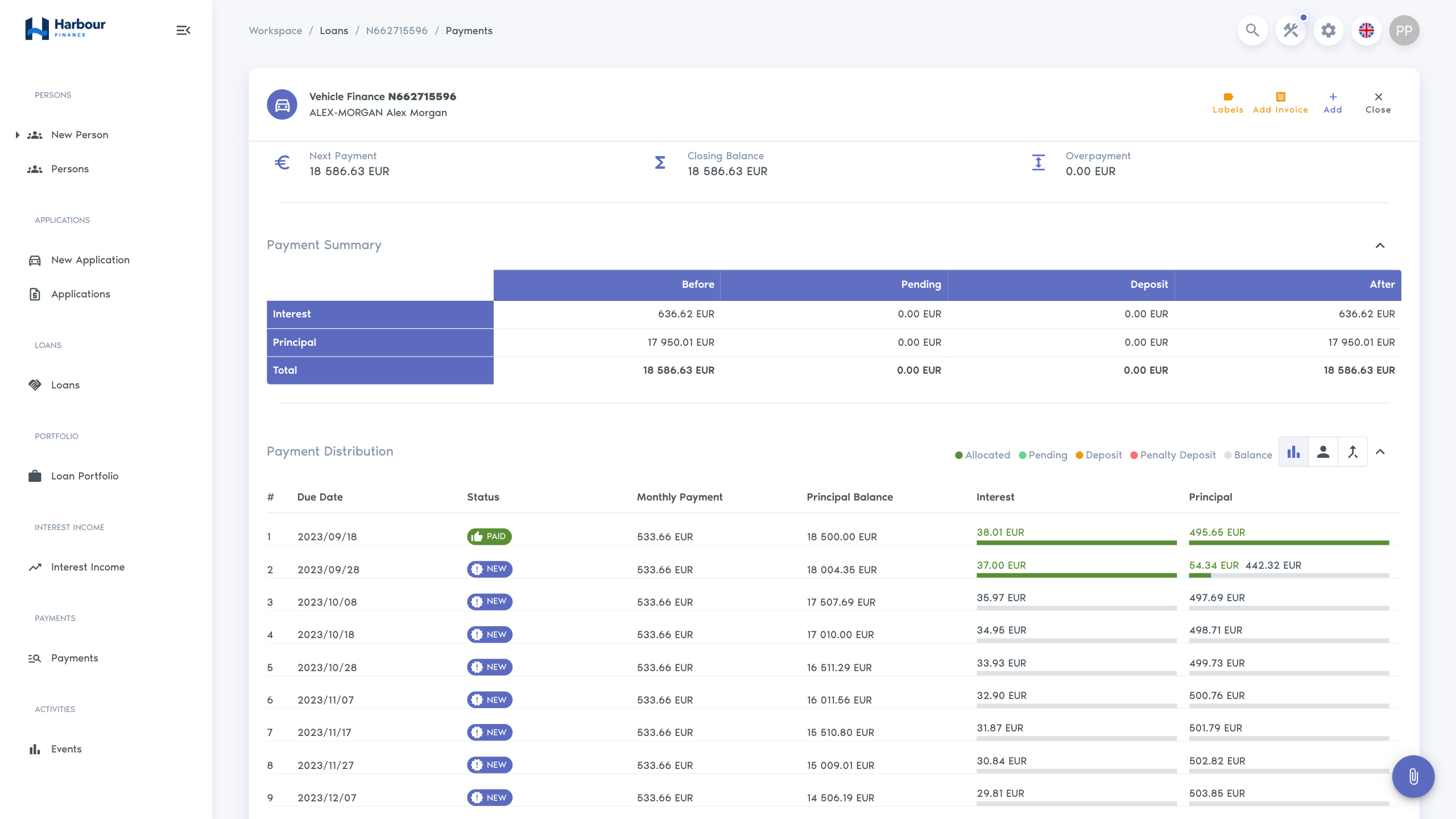
| Status | Meaning |
|---|---|
| Allocated | Applied to a specific schedule or invoice amount. |
| Pending | Recorded but awaiting the point at which it can be allocated. |
| Deposit | Held for later general allocation. |
| Penalty Deposit | Held for later penalty allocation. |
| Overpayment | More was received than the current calculation could apply. |
The payment preview separates Before, Pending, Deposit, and After values by line and in total. Use these columns to see which balance a payment changed.
Additional invoice lines
Use Add Invoice in a loan's Payments area to record charges outside its standard principal and interest schedule. The available Installment Type choices are Permit Preparation, Commission, Debt Collection, Vehicle Repossession, Reinstatement Fee, and Amendment Fee. Adding a fee records an amount to collect; it does not record money received.
You need access to the loan's Payments area and the Add Installment Manually permission. Add Invoice is hidden when the calculated loan status is Repaid. Confirm the charge, currency, dates, and authority under the applicable agreement and internal procedure before adding it. Check the distribution for an existing charge to avoid a duplicate.
Create an additional fee
- Open the loan and select Payments, then Add Invoice.
-
Complete the dates and the first fee line:
Field What to enter Due Date The date the charge is due. This affects its place in the distribution and whether the calculation treats money as due or held for later. Start Date, End Date The period covered by the invoice. All lines added in this dialog share these dates and the due date. Review the defaults: today for the due and start dates, and one month later for the end date. Installment Type The charge category. Select the matching type in the payment's allocation order when collecting it. Amount The charge in the loan's currency. For the worked example below, enter 25.00 for Amendment Fee on a EUR loan. -
If several charges share the same dates, use the plus control, Add Operation, to enter another type and amount. Use separate invoices when dates differ. Removing an operation here changes only the unsaved form.
- Select Add inside the Add Invoice dialog. This saves the invoice and refreshes the payment calculation. It is separate from Add on the payment page, which records a receipt.
- In Payment Distribution, locate the added row by its dates, type, and amount. Check Payment Summary and Actual Information after recalculation. If saving reports an error or the result is uncertain, inspect the distribution before trying again.
Worked example: collect a €25 amendment fee
Use a practice loan for this example. Assume its only unpaid amounts are €20 interest and €80 principal due today, with no penalties, previous unallocated money, or other charges. Add a €25 Amendment Fee due yesterday, using the period appropriate to that charge. The amounts to collect now total €125.
- On Payments, choose Regular payment, confirm the Payer, and select Per payment schedule as the Payment Action.
- Check that Payment Order includes Amendment Fee, Interest, and Principal, with interest before principal. The fee's earlier due date is significant: with a built-in calculator, unpaid instalments are considered by due date, then the selected payment order is applied within each instalment. Moving a fee type to the front does not override an earlier instalment's due date.
-
Enter 100.00 as the Amount and today as the Payment Date. Wait for the preview to finish calculating and compare these amounts:
Amount Before payment From this receipt Still unpaid Amendment fee, due yesterday €25 €25 €0 Interest, due today €20 €20 €0 Principal, due today €80 €55 €25 Total €125 €100 €25 -
Check the fee row and the interest/principal row in Payment Distribution, alongside the Before, Pending, Deposit, and After figures. Under these assumptions, the receipt is fully applied to due amounts, with no deposit or overpayment. Without the fee, the same €100 would settle all €20 interest and €80 principal.
- Select Add on the payment page only after the preview matches the intended receipt. Check that the payment appears once with the correct payer, amount, and date, then reopen the loan's Payments area to confirm the saved distribution and €25 remaining principal.
This example uses the built-in calculators. An external Loan Calculator integration can apply different rules. If the result differs, check dates, existing allocations, payment action, and order before saving. A fee type omitted from Payment Order does not receive money from that payment with the built-in calculators; a future-dated charge can receive a Deposit instead of settlement of a currently due amount. Adding a fee does not guarantee that money already allocated elsewhere will move to it.
Correct an additional fee
There is no edit action for a saved additional invoice in this view. Correct an eligible unpaid invoice by deleting it and adding the replacement. Delete removes the whole invoice row, including every fee entered together through Add Operation; it does not remove just one amount column.
For example, if the €25 fee should have been €15 and no money has been allocated to it:
- Open Payments and locate the invoice in Payment Distribution. Note its dates and every line that must be retained in the replacement.
- Select the row's Delete control and confirm the permanent action. The distribution recalculates. Verify that the original fee row is gone before proceeding.
- Use Add Invoice to recreate the invoice with Amendment Fee of 15.00, the correct dates, and any other valid lines from the deleted row.
- Confirm that only the replacement remains. With the worked example's €20 interest and €80 principal still unpaid, the amount to collect is now €115. A €100 receipt would settle €15 fee, €20 interest, and €65 principal, leaving €15 principal unpaid.
The row's Delete control appears when at least one line other than principal, interest, or penalty has no allocations. A multi-line row can therefore expose Delete even when another line already has allocations. Inspect every line before confirming. An outstanding balance alone does not prove that a fee has no allocations: a partially paid fee already has money assigned to it.
If the €100 receipt from the worked example has already been saved, the single-line €25 fee has an allocation and its Delete control is unavailable. An authorised payment-correction user must first follow Correct a payment, removing affected payments from the newest eligible payment backwards. Preserve each receipt's payer, amount, date, type, action, and order before removing it. Once the fee has no allocations, replace it, then re-enter the valid receipts in their original sequence and check each preview. For this example, re-entering the same €100 receipt against the €15 fee leaves €15 principal unpaid.
Stop and hand the correction to an authorised servicing user if payment removal is unavailable, later transactions prevent it, or other allocated lines would be affected. For a provider-created payment, complete bank-payment reconciliation before making a manual replacement. After correction, check the payment list for duplicates, the distribution and current figures, and the loan history for the invoice and payment changes.
Investigate an unexpected balance
- Check the calculation date in Actual Information.
- Compare the payment date with the instalment due dates.
- Open the payment distribution and note the selected action and allocation order.
- Check pending, deposit, penalty deposit, and overpayment amounts.
- Review added or deleted invoice lines and payments in history.
- If an integrated bank payment is involved, compare its provider transaction with the Finsaku payment record.
For a missing or apparently duplicated bank payment, follow the integrated bank-payment reconciliation before making a manual correction.