Credit reports and enrichments
An enrichment stores a dated result returned by a configured service for a person or application. The KIB credit-bureau enrichment is available for private-person borrowers when the tenant has the required definition, integration, and permissions.
An enrichment result supports review. It does not approve or reject an application by itself.
- For
- Authorised application users requesting or reviewing external borrower information.
- Requires
- A saved application with the correct private-person borrower, enrichment permissions, a configured object, and an enabled KIB provider.
- Available when
- The borrower section shows Enrichments and the configured KIB action.
- Before you begin
- Save application changes, review dated earlier results, confirm the borrower, and follow the organisation's approved legal-basis procedure.
- Expected result
- A successful request stores a dated result in enrichment history; a failed request is reviewed before retrying.
Where enrichment fits in processing
An enrichment answers what an external service returned and when. It is information attached to the person or application, not an application operation. A reviewer can use it with the terms, documents, and other collected information.
A configured decision separately evaluates its application conditions and can run an application operation. An event action separately performs follow-up after a platform event. Requesting an enrichment does not perform either job. See Core concepts and statuses.
Where enrichments appear
| Location | What it shows |
|---|---|
| Person record | Enrichments history with name, enrichment type, completion date, summary, and a details action. |
| Loan application borrower section | An Enrichments action that opens the borrower's history and, when configured and permitted, a KIB request action. |
| Application enrichment section | Current enrichment results with name, type, updated date, summary, and row details. Availability depends on the product data definition. |
An administrator must configure an enrichment object, an enabled provider, its summary template, and any reuse period. The user also needs the relevant application and history permissions.
Request a KIB enrichment
- Open the correct saved loan application and identify the private-person borrower.
- Save any application changes before requesting the report.
- In the borrower section, select Enrichments.
- Review earlier results and their dates so you do not request an unnecessary duplicate.
- Select KIB.
- Choose whether Finsaku should Open the enriched data dialog automatically after completion?
- Select Enrich.
- Wait for the completion or failure notification. The request can take time and Finsaku checks its status in the background.
If the application has unsaved changes, Finsaku warns that enrichment will refresh the application and overwrite them. Close the dialog and save first unless losing those changes is intentional.
Review the result
Open a completed row from enrichment history. A KIB result can contain:
- identity, full name, age, birth date, request date, and reference number;
- KIB, SRS, and CREFO statuses;
- probability of default, risk segment, and credit score where returned;
- yearly and monthly income information;
- open and closed contracts;
- payment incidents.
Check the borrower identity, request date, reference number, and whether key sections are absent before using the result. “No data returned” is not automatically the same as a confirmed negative finding.
Current result and history
The current application view can show the latest applied result, while the person's enrichment history keeps completed results from earlier requests. Use the dated history to explain what information was available at a decision point.
An enrichment definition can reuse a successful result for a configured number of days. Check the displayed update date and your organisation's freshness rule; reuse avoids a provider call but does not make old information current indefinitely.
Correct data before retrying
| Result | What to do |
|---|---|
| Request remains pending | Wait and refresh the relevant view. Do not send repeated requests while the provider may still be processing. |
| Request fails | Check required borrower data and ask an administrator to check the KIB integration and provider response. Retry only after the cause is understood. |
| Result belongs to the wrong borrower | Stop using it, verify the application party, and follow the organisation's correction and data-handling procedure. |
| Summary and details differ | Open the full result. The summary is generated from a configured template and is not a substitute for the details. |
| A fresh request shows different values | Keep both dated results and follow the review process for changed external information. |
When a failure points to provider configuration, an authorised administrator should open the KIB integration and confirm its environment and report settings. Do not copy credentials into the investigation record.
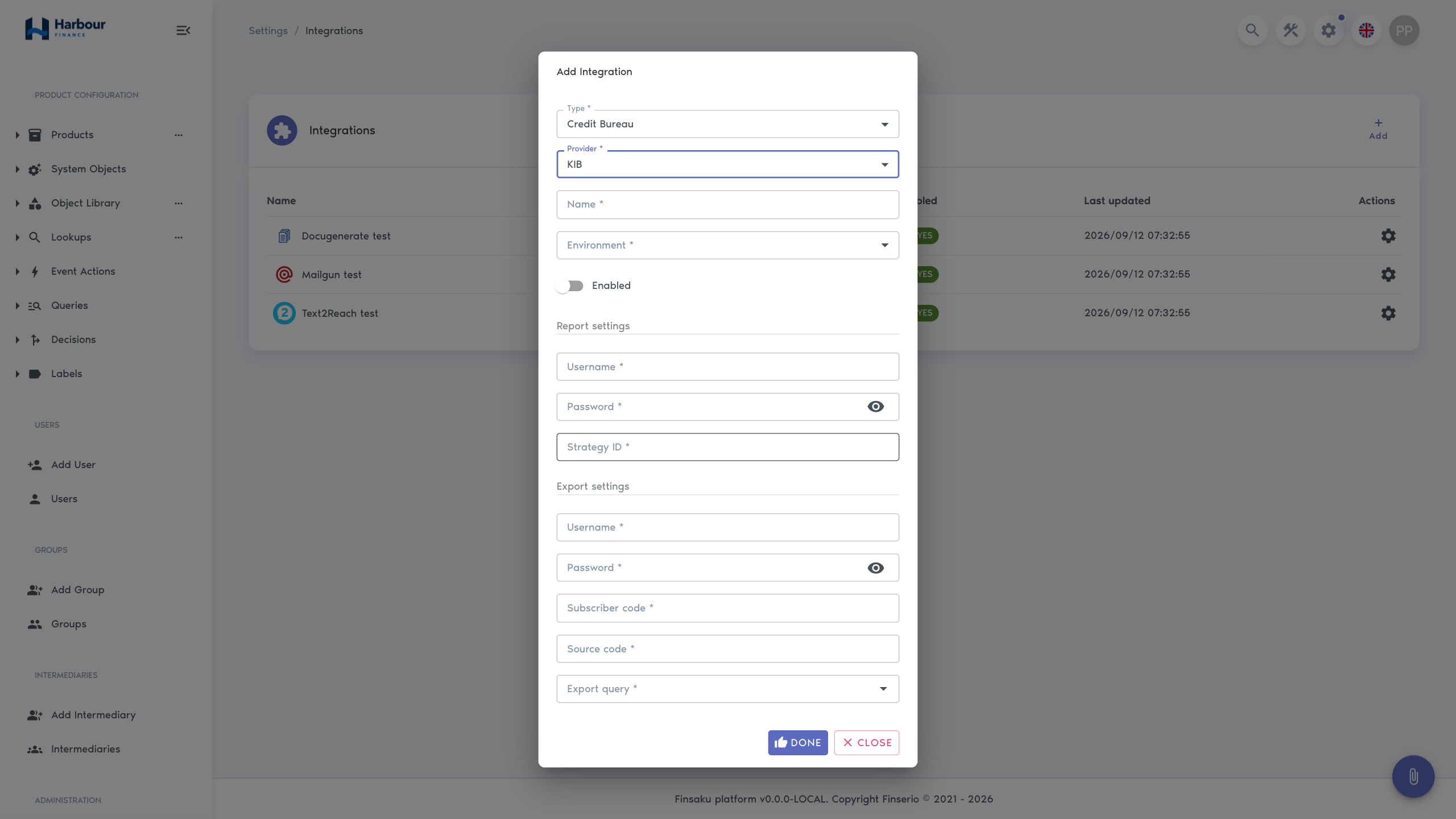
External requests can carry a cost and sensitive personal information. Confirm the correct borrower and the organisation's approved legal basis before requesting one. Administrators can use Integrations and Objects and fields to check the provider and enrichment definition.