Lookups
A lookup is a controlled list used by configured fields. It replaces free text when the organisation needs consistent values for rules, queries, documents, or integrations.
- For
- Administrators maintaining controlled field values.
- Requires
- Lookup and object configuration permissions, stable keys, displayed names, and required translations.
- Available when
- A configured field uses the lookup in a person, application, or loan data structure.
- Before you begin
- Check existing records, filters, decisions, templates, and integrations that depend on each key.
- Expected result
- The field shows the ordered values and existing stored values remain readable and correctly mapped.
Lookup structure
A lookup has a name, translation, stable key, and optional icon. Each ordered value has its own displayed name, translation, and stable key.
Use the displayed name for wording shown to users. Use the key as the durable value stored or exchanged by configuration. For example, changing “Employed” to a clearer translation should not require changing its established key.
| Field | Purpose |
|---|---|
| Name | Administrative and user-facing lookup name. Maintain translations for every supported language in which it appears. |
| Key | Stable identifier used by configuration and integrations. Do not reuse an established key for a new meaning. |
| Icon | Optional visual identifier shown where the configured field supports it. |
| Values | Ordered choices. Each value has its own displayed name, translations, and stable key. |
Create a lookup
- Open Administration → Add Lookup.
- Enter the lookup Name, translations, and Key.
- Choose an icon when it helps users recognise the list.
- Add each value with its displayed name, translations, and key.
- Put the values in a useful order.
- Select Add and confirm that the lookup opens with the expected values.
- Add it to the intended configured field under Objects and fields, then test data entry and display.
Creating a lookup does not make it appear on a form by itself. A configured field must use it, and that field must be part of the relevant person, application, or loan data structure.
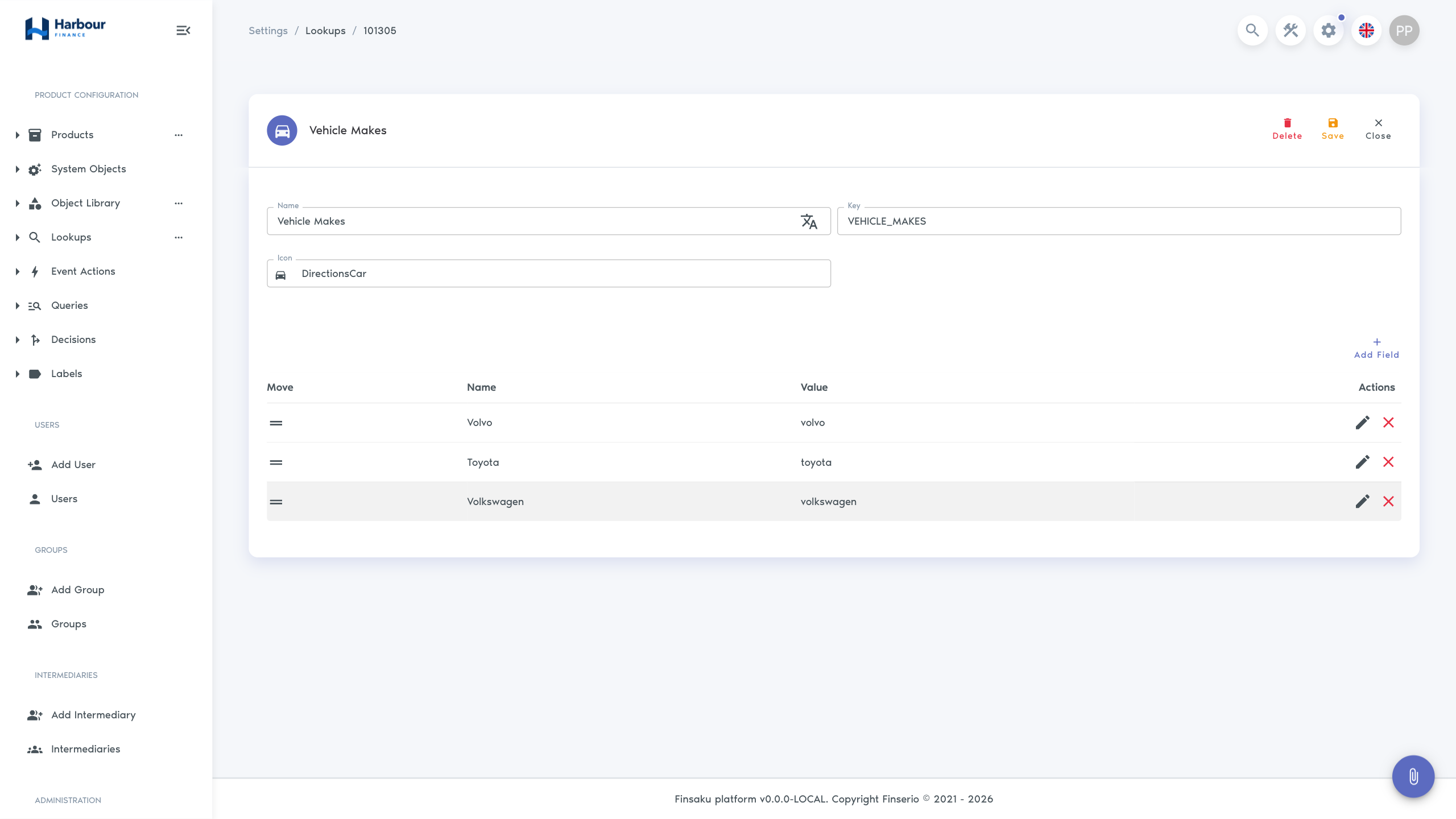
Maintain values
Open the lookup and select Edit. You can add values, edit their displayed names and translations, remove rows, and change their order. These changes are staged in the form: select Save to persist the complete lookup.
After saving, test an existing record and a new selection. Renaming a displayed value should preserve the durable key; changing a key can break rules or external mappings even when the form still looks correct.
Choose lookup values
- keep choices mutually understandable and avoid near-duplicates;
- use a neutral value such as “Not provided” only when the business process permits it;
- place common values in a useful order without encoding priority into the key;
- translate every value used in a supported language;
- document which team owns changes to regulated or externally mapped lists.
Change impact
A lookup value can be used by existing records, query filters, decision conditions, display conditions, templates, and integrations. Deletion is permanent and can make earlier data difficult to interpret. Before deleting or changing a key, search those dependencies and plan how existing values will remain readable.
If a value should no longer be selected but must remain meaningful on old records, use the organisation's agreed retirement approach rather than reusing its key for a different meaning.
Check dependencies before deletion
Deleting an entire lookup requires the lookup-delete permission and a permanent-action confirmation. Removing a value also becomes effective only after saving the edited lookup.
Before deleting a lookup or value:
- find configured fields that use it;
- inspect saved-query filters and columns;
- inspect decisions and display conditions;
- search document and message templates for the key or value;
- confirm external-system mappings;
- decide how existing records will remain understandable;
- remove or migrate dependencies, then test them before deletion.
If the interface rejects deletion, treat that as a dependency signal. Do not replace a referenced key with a superficially similar value without verifying stored data and integrations.
Troubleshooting
| Symptom | Check |
|---|---|
| Lookup does not appear on a form | The configured field uses this lookup and the field is included in the applicable object or product. |
| A value still appears after removing its row | The edited lookup was saved and the page was refreshed. |
| Translation is missing | Both lookup and value translations for the user's locale. |
| A rule stopped matching | The durable value key. Displayed wording alone does not identify the stored value. |
| Deletion is unavailable | Delete permission and remaining dependencies. |