Objects and fields
Objects define structured information that products can collect. System Objects cover platform record structures. Object Library contains reusable custom structures that can be attached to product versions.
- For
- Administrators designing reusable person, application, loan, or enrichment data.
- Requires
- Object and field configuration permissions plus agreed keys, types, validation, and display rules.
- Available when
- The object can be attached to the relevant product version or used by the system record.
- Before you begin
- Define the data owner, repetition limits, mandatory fields, conditions, lookup dependencies, and summary use.
- Expected result
- The intended fields appear in the configured order and enforce the tested visibility and validation rules.
System Objects and Object Library
| Area | Purpose | Change boundary |
|---|---|---|
| System Objects | Built-in definitions for platform concepts such as people, applications, loans, users, and intermediaries. | Their object type and stable identity are predefined. Protected fields cannot be treated like fields in a tenant-created object, and changes can affect several products or workflows. |
| Object Library | Tenant-created custom or enrichment structures that can be reused in product versions or referenced from an Object field. | The tenant controls the object's key, fields, control type, order, display condition, and summary. Dependencies must be checked before changing or deleting it. |
A product version assembles the objects used by one product and fixes their order and field settings for work created with that version. Attaching an Object Library item uses its current definition. A later library edit does not silently rewrite earlier locked product versions.
Use Configure collected data for a worked vehicle-finance example with a lookup, reusable object, validation ranges, and product-version activation.
Choose the right reuse boundary
| Need | Approach |
|---|---|
| The required structure already exists and its meaning matches | Reuse the existing Object Library or System Object definition. Do not create a second object with a different key for the same concept. |
| A reusable definition exists but the product does not collect it yet | Create a new product version and attach the existing object to that version. Activate the version only after its order, fields, and responsive layout are checked. |
| The fields are specific to one product and are unlikely to be shared | Create a product-specific object in that product version. Keep its key scoped to that meaning and avoid placing a one-off structure in the Object Library. |
| Several products need the same tenant-defined structure | Create it once in the Object Library, then attach it to each applicable product version. |
Mortgage example: reuse Address inside Property details
A mortgage application can collect collateral without duplicating the platform's address fields:
- In Object Library, create Property details with a stable key such as
propertyand Single Object control type. - Add property-specific fields such as Property type, Estimated value, and Construction year.
- Add an Object field named Address and select the existing Address object as its referenced object.
- Attach Property details to a new version of the mortgage product and place it in the intended order.
- Check that the nested address fields, property summary, and required validation appear in a new mortgage application before activating the version.
The mortgage product owns the decision to collect Property details; the existing Address definition supplies the shared address structure. This keeps address formatting and downstream paths consistent across products.
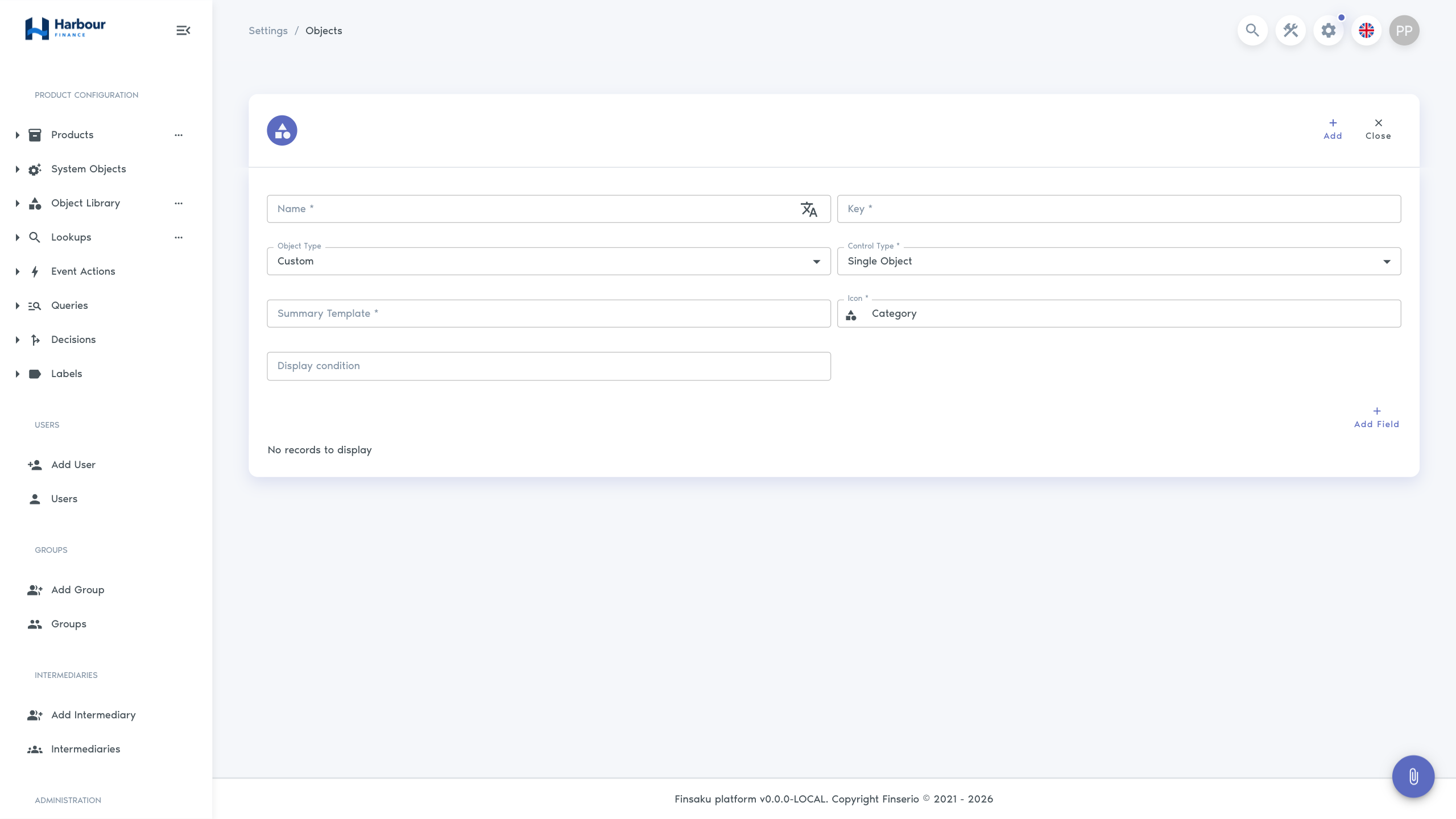
Object settings
An object has a display name, stable key, type, icon, control type, field order, number of columns, and optional summary template or display condition. Icon is required when creating an Object Library definition. A repeated object can also define minimum and maximum entry counts. Predefined structures can support a uniqueness rule.
Number of Columns controls how fields are arranged across the object on a wide screen. Use it to keep related short fields together without making the form dense. Finsaku adapts the layout for narrower screens, so check both a desktop and a narrow viewport before activating a product version.
An Enrichment object stores data returned by a configured provider. It can specify the provider and a maximum cache age, in days, before a fresh result is required.
Field types
| Type | Use |
|---|---|
| String | Short text such as an identifier or title. |
| Text | Longer or multiline text. |
| Integer | Whole numbers. |
| Numeric | Decimal numbers with configurable precision. |
| Money | A monetary amount used with currency context. |
| Date | A calendar date without a time. |
| Date and Time | A date with a time. |
| Boolean | A Yes/No value, with optional highlighting. |
| Lookup | One controlled value from a configured lookup. |
| Object | A nested configured object. |
| Customer | A reference to a private or legal person. |
| User | A reference to a platform user. |
| Secret | Generated or protected credential-like text. |
| Currency | A configured currency code. |
| String Array | Several text values. |
| Integer Array | Several whole-number values. |
| Phone | A telephone value with phone-oriented input. |
Choose a type based on how the value must be validated, searched, printed, and sent to other systems. A numeric identifier should usually remain a String if leading zeroes matter or arithmetic is never required.
Common field settings
All fields have a stable key and translated display name. Icon is also required before a field can be saved; it identifies the field in forms and configuration screens. Mirror key, default value, display condition, and order are separate settings. A field can be mandatory, hidden, or unused; these are separate states.
Type-specific options include:
- pattern validation for String and Text;
- default value, allowed values, unit, and unit position for Integer and Numeric;
- range validation for Integer, and decimal places for Numeric;
- none, static, dynamic, or current default for Date, plus whether future dates are allowed;
- selected lookup and printout value for Lookup;
- referenced object, summary display, and summary template for Object;
- permitted private or legal party types for Customer;
- global or affiliation user search for User;
- letter, number, and symbol counts for generated Secret values;
- Yes and No highlighting for Boolean.
Integer and Numeric validation
The two number types do not offer the same Field Attributes Type choices.
| Field type | Available choices | What they enforce |
|---|---|---|
| Integer | Any Value, Specific Value, Range | Specific Value limits entry to a list of whole numbers. Range supplies whole-number Minimum value and Maximum value boundaries. |
| Numeric | Any Value, Specific Value | Specific Value limits entry to a list of decimal values. Decimal places controls precision, but the field editor does not provide minimum and maximum boundaries. |
The built-in Annual Interest Rate field is Numeric. Its field form therefore cannot enforce a continuous interval such as 2%–5%. Use Specific Value only when every permitted rate can be listed individually. If the product requires a continuous decimal interval, treat that validation as a separate product rule and test the complete application flow; do not describe the field itself as range-validated.
Keys and dependencies
Document templates, queries, decisions, display conditions, calculations, and integrations can refer to object and field keys. Treat a key as an interface, not a caption. Change the translated name when wording changes but the meaning is the same. Create a planned migration when the business meaning changes.
Before deleting or hiding a field, test how existing records render and whether required data, rules, documents, exports, or provider payloads still use it.