Saved queries
A saved query sets the records, columns, filters, sorting, and visibility for a Workspace list, an embedded related list, or a global-search result group. Its export uses the same result set.
- For
- Administrators configuring lists, search results, embedded views, and exports.
- Requires
- Query administration permission and access to the record type and fields used by the result.
- Available when
- The selected record type supports the intended placement, visibility, filters, and operations.
- Before you begin
- Define the audience, expected records, excluded records, columns, date basis, search fields, and export scope.
- Expected result
- The intended user sees the query in the correct place with the expected rows, columns, filters, and operations.
Record types
Finance queries can use Persons, Loan Applications, Loans, Loan Portfolio, Payments, Interest Income, Users, Permission Groups, or Intermediaries.
Placement and visibility
| Option | Effect |
|---|---|
| Tree Menu | Adds the saved list to Workspace navigation. |
| View Loan Application | Embeds the list in an application view. |
| Edit Loan Application | Embeds the list while an application is being edited. |
| View Person | Embeds the list in a person record. |
| Global Search | Includes this record type in global-search results. |
| Internal visibility | Applies the configured internal restriction. |
| Partner visibility | Makes the saved query available to users with List Partner Queries. For Loan Application, Finsaku also matches the current affiliation to Submitter when the user's effective permissions do not include List Internal Queries. |
Visibility is part of access design. The automatic affiliation condition described above is specific to application queries; do not assume the same condition protects Loans, Payments, or every other record type. Test with an ordinary internal user and, where used, a partner-affiliated user. A convenient query must not expose records outside the intended relationship.
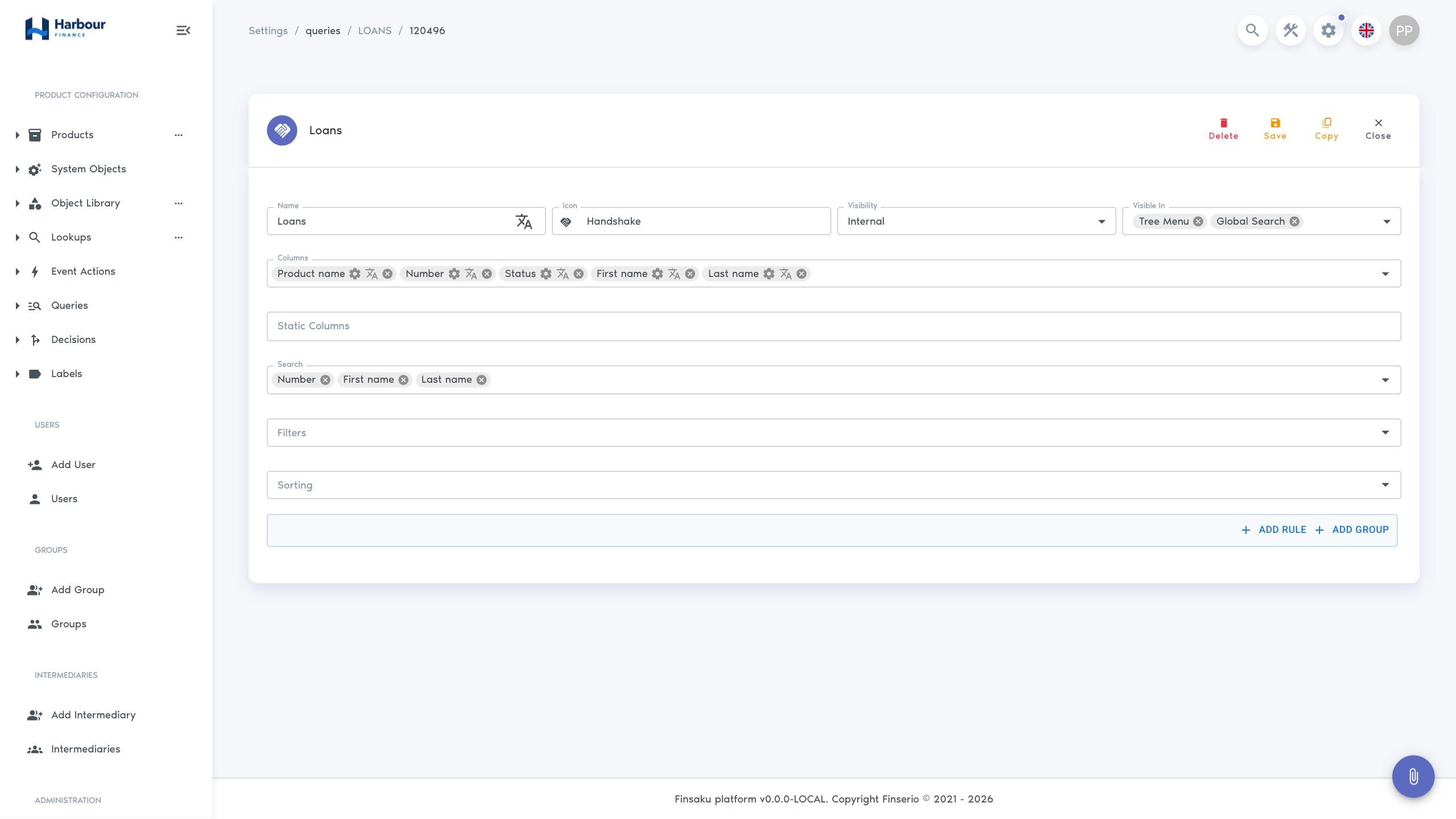
Columns, search, and filters
Choose and order the result columns. Each can have translated wording and settings such as date format or a report key. Static columns add a fixed name and value. Search fields must also be selected result columns.
Administrator-defined filters support:
| Value type | Operations |
|---|---|
| Text | Contains-like matching or exact equality. |
| Number and date | Equal, greater than or equal, less than or equal, or between. |
| Select | One value or any of several values. |
| Assignee | User selection, optionally limited by permission groups. |
Sorting uses a selected column in ascending or descending order. The condition builder supports individual rules and nested AND/OR groups, which define the permanent result set before a user's filters are applied.
Configure and test a list
- Choose the record type and a clear translated name and icon.
- Set the visibility and locations.
- Add only the columns users need to identify and act on a row.
- Add search fields for known-record lookup.
- Add permanent conditions for the operational purpose.
- Choose a stable default sort.
- Test no results, one result, many results, export, and row navigation.
- Test every intended user group.
Use Copy to create a related view without changing a working query. Delete only after checking menus, global search, embedded record views, reporting, and batch integration settings that may refer to it. Use Distribute lending through intermediaries for the complete partner application setup and negative scope tests.